
나의 개발일지
[SpringBoot] hiddenmethod를 이용한 타임리프 환경에서 PutMapping, DeleteMapping 활용법 본문
[SpringBoot] hiddenmethod를 이용한 타임리프 환경에서 PutMapping, DeleteMapping 활용법
사각분무기 2024. 1. 14. 16:51get 과 post만을 활용하는 기존의 http의 통신 방식과는 다르게 REST API 환경에서는 put, delete, patch 를 추가로 사용합니다.
REST API 서버를 운용하는게 아니라면 put, delete, patch 를 활용할 수 없기도 하고, post로 모든 부분이 대체가 가능하기 때문에 꼭 활용할 필요는 없지만 스프링부트에서는 hiddenmethod라는 기능을 지원합니다.
실제로 put, delete, patch 기능을 활용할 수 있게 되는 것은 아니고, post 요청이 날아가지만 이름만 delete 로 바뀐다고 이해하시면 됩니다.
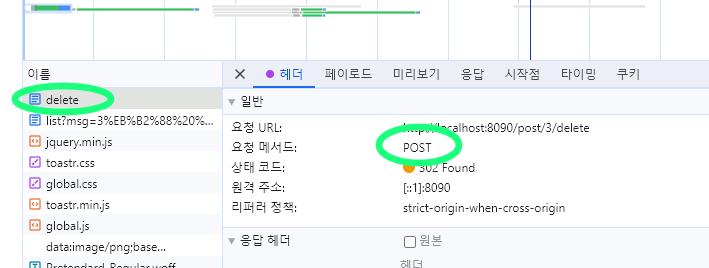
post를 활용하되 보이는 모습을 delete 로 바꿀 뿐이지만 개발자들의 입장에선 이 요청이 무엇을 위한 요청인지 확인하기 위한 가독성 확보 측면에 있어 유의미할 수 있습니다.
이 기능을 활용하기 위해선 properties 파일 혹은 yml 파일에 다음과 같은 내용을 입력해주셔야 합니다.
// properties 코드
spring.mvc.hiddenmethod.filter.enabled: true

// yml 코드
spring:
  mvc:
    hiddenmethod:
      filter:
        enabled: true
PutMapping 과 PatchMapping 은 공통적으로 수정을 담당합니다. put의 경우는 전체 업데이트, patch의 경우 부분 업데이트를 할 경우 활용한다는 차이가 있다고 합니다. 이 중 PutMapping 을 활용하는 방법을 알아봅니다.
스프링부트의 @PutMapping 어노테이션을 활용해 액션메소드를 작성해줍니다.
    @PreAuthorize("isAuthenticated()")
    @PutMapping("/{id}/modify") // 핵심
    public String modify(
            @PathVariable long id,
            @Valid ModifyForm form
    ) {
        Post post = postService.findById(id).orElseThrow(() -> new GlobalException("404-1", "해당 글이 존재하지 않습니다."));

        if (!postService.canModify(rq.getMember(), post)) throw new GlobalException("403-1", "권한이 없습니다.");

        postService.modify(post, form.getTitle(), form.getBody(), form.isPublished());

        return rq.redirect("/post/" + post.getId(), post.getId() + "번 글이 수정되었습니다.");
    }
html 코드는 아래와 같이 작성해주시면 됩니다.
    <form th:action method="POST" onsubmit="submitModifyForm(this); return false;">
        <input type="hidden" name="_method" value="PUT">
        <div>
            <label>공개</label>
            <input type="checkbox" name="published" th:checked="${post.published}">
        </div>

        <div>
            <label>제목</label>
            <input type="text" name="title" th:value="${post.title}">
        </div>

        <div>
            <label>내용</label>
            <textarea name="body" th:text="${post.body}"></textarea>
        </div>

        <button type="submit">글수정</button>
    </form>
핵심 코드
<form th:action method="POST" onsubmit="submitModifyForm(this); return false;">
    <input type="hidden" name="_method" value="PUT">
</form>
DeleteMapping 활용
    @PreAuthorize("isAuthenticated()")
    @DeleteMapping("/{id}/delete") // 핵심
    public String delete(
            @PathVariable long id
    ) {
        Post post = postService.findById(id).orElseThrow(() -> new GlobalException("404-1", "해당 글이 존재하지 않습니다."));

        if (!postService.canDelete(rq.getMember(), post)) throw new GlobalException("403-1", "권한이 없습니다.");

        postService.delete(post);

        return rq.redirect("/post/list", post.getId() + "번 글이 삭제되었습니다.");
    }
html 코드
<form style="display: contents"
      th:if="${@postService.canDelete(@rq.member, post)}"
      th:action="|/post/${post.id}/delete|"
      method="POST"
>
    <input type="hidden" name="_method" value="DELETE">
    <button onclick="return confirm('정말로 삭제하시겠습니까?');">글 삭제</button>
</form>
이외에 강사님이 알려주신 방법이 따로 있습니다.
별도의 설정을 통해 기존의 방식보다 조금 더 깔끔한 코드를 작성하기 위한 방법입니다.
태그 하나로 작성할 수 있기 때문에 기존의 코드보다 간단히 작성할 수 있다는 장점이 있습니다.
<a
        th:if="${@postService.canDelete(@rq.member, post)}"
        th:href="|/post/${post.id}/delete|"
        method="DELETE"
        onclick="return confirm('정말로 삭제하시겠습니까?');"
>
    글 삭제
</a>
위 방식을 사용하기 위해 자바스크립트 함수 하나와 meta 태그 두개를 html 코드에 입력이 선행되어야 합니다.
$(function () {
    $('select[value]').each(function (index, el) {
        const value = $(el).attr('value');
        if (value) $(el).val(value);
    });

    $('a[method="DELETE"], a[method="POST"], a[method="PUT"]').click(function (e) {
        if ($(this).attr('onclick-after')) {
            let onclickAfter = null;

            eval("onclickAfter = function() { " + $(this).attr('onclick-after') + "}");

            if (!onclickAfter()) return false;
        }

        const action = $(this).attr('href');
        const csfTokenValue = $("meta[name='_csrf']").attr("content");

        const formHtml = `
        <form action="${action}" method="POST">
            <input type="hidden" name="_csrf" value="${csfTokenValue}">
            <input type="hidden" name="_method" value="${$(this).attr('method')}">
        </form>
        `;

        const $form = $(formHtml);
        $('body').append($form);
        $form.submit();

        return false;
    });

    $('a[method="POST"][onclick], a[method="DELETE"][onclick], a[method="PUT"][onclick]').each(function (index, el) {
        const onclick = $(el).attr('onclick');

        $(el).removeAttr('onclick');

        $(el).attr('onclick-after', onclick);
    });
});
<meta name="_csrf" th:content="${_csrf.token}"/>
<meta name="_csrf_header" th:content="${_csrf.headerName}"/>
기존의 스프링부트에서 처리해주는 hiddenmethod 방식과는 별개로 직접 자바스크립트 코드를 통해 post로 변환하고 csrf 토큰도 넣어주는 방식이라고 합니다.
'Language > SpringBoot' 카테고리의 다른 글
| [SpringBoot] WebClient 비동기 흐름 내 Transaction 비활성화 트러블슈팅 - 1 ( 토스페이먼츠 WebClient 로 구현 ) (0) | 2024.02.22 |
|---|---|
| [SpringBoot] Page와 PageImpl (0) | 2024.02.21 |
| 스프링 시큐리티 환경에서 H2 사용하기 위한 csrf 제어 코드 (0) | 2024.01.07 |
| 스프링부트 TDD 환경에 유용한 DB쿼리 송출 yml 코드 (0) | 2024.01.07 |
| 인텔리제이 Thymeleaf layout 컴파일에러 표시 없애기 (0) | 2024.01.07 |
